

You have twenty pages on one topic. Some are two years old. None of them link to each other, there is no strategic structure. A visitor who lands on the wrong one has no way of finding the other nineteen, and neither does a search engine.
If you want to create authority in one specific topic a content hub is in my opinion the best way to archive that. It puts every page you own on a subject in one place, in an order that makes sense to someone reading it for the first time, and it makes sense to search engines as well.
What are Content Hubs?
A content hub is a page, or a group of pages, built around one topic. It aims to be the last place a visitor needs to look on a given topic, because it is comprehensive and in-depth. If they came for one thing and stayed to read three more, the hub is doing its job.
Think of a content hub as a strategically placed section within your website. It typically includes multiple pages or posts that are all related to the same topic. By organizing your content in this way, you make it easier for visitors to find the information they need and improve the user experience.
I have coordinated SEO initiatives for the last fifteen-plus years, and a thoughtfully planned content hub and structure should be at the core of any content strategy. In my opinion it is one of the most effective ways to become more visible on a given topic and attract prospects.

Types of Content Hubs
There are several general types of content hubs, each serving a unique purpose in organizing and presenting content around a specific topic. A content hub is a curated collection of content that helps users find answers to their questions, solve problems, take action, and make better decisions, and may include various content formats such as articles, images, videos, audio, and tools.
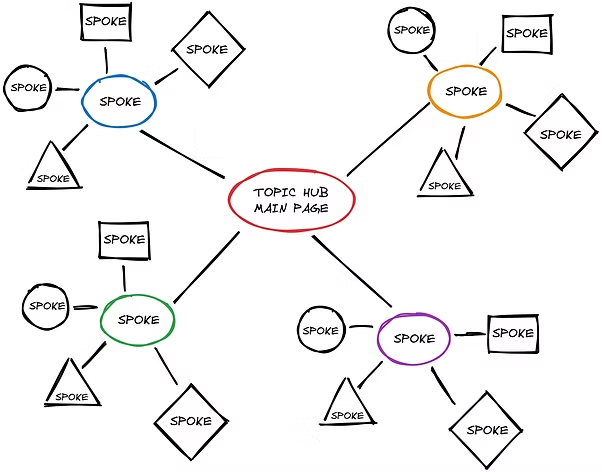
Classic Hub & Spoke:
A classic hub and spoke has one main page on the topic. The spoke pages each cover a single part of it, and each one links back to the main page.
Content Library:
Everything in a content library sits under one subject and is sorted into categories. If you have twenty pages on pricing and no clear order for them, this is the shape that gives them one.
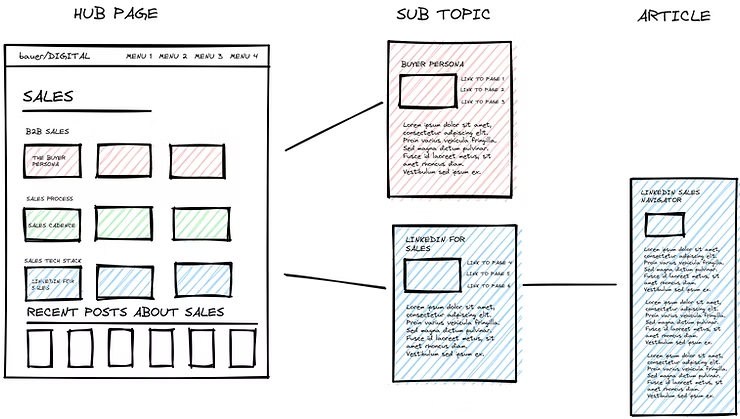
Topic Gateway:
A topic gateway is a content hub that presents a collection of resources on a specific topic. This type of hub acts as a centralized access point for users to find relevant and useful information about a particular subject, like Diet Doctor´s Keto Diet for beginners gateway.
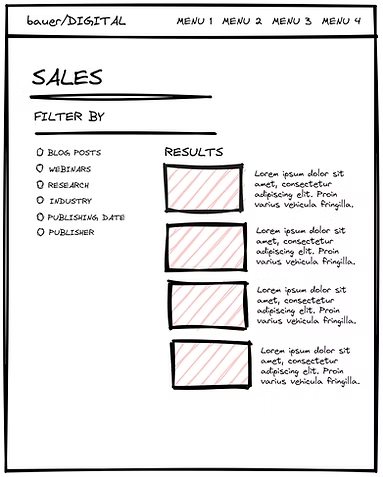
Content Database:
A content database is a searchable store. Readers filter it to the entry they want instead of working through a reading order. It runs on structure rather than on editorial judgment, so the search has to be right before it is useful.
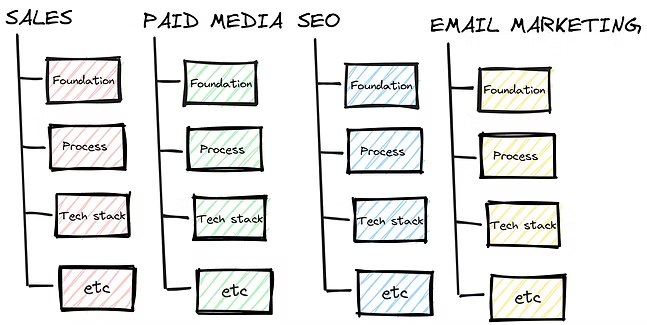
Topic Matrix:
A topic matrix sets related pages in a grid, with one question down the side and another across the top. It is the only shape here built for comparison, and it earns its keep on a small set of pages that answer each other. You will rarely need it.
How do Content Hubs work?
A content hub gathers everything you have on one topic and puts it in one place, it aims to create a logical structure for the posts.
Inside the hub, the order does the work. Overview first. Then the deeper guides, in the sequence a beginner would read them. Short answer, then the long one. Some hubs carry video and infographics, but the order matters more than the formats.
Why are Content Hubs important for SEO?
Content hubs are essential for SEO because they help you to target specific keywords and phrases. By creating a central hub for a particular topic, you make it easier for users and search engines to understand the focus of your content.
When you create a content hub, you typically link to it from other pages on your website. This helps to build internal links, which are an essential factor in SEO. Internal links help search engines to understand the structure of your website and the relationships between different pages.
Content hubs also keep visitors on your website for longer. When someone finds an answer here, they read the next page instead of going back to search. More of your pages get seen, and the next step you want them to take sits one click away.
Do content hubs still matter when AI gives the answer?
Search results look different now. For some searches, Google shows an AI-written summary at the top of the page, assembled on the spot from several websites. Chat assistants work in a similar way. So it is fair to ask whether a carefully organized hub still earns you anything when the answer is put together by a machine instead of clicked from a list of links.
The short answer is yes, and the reason is mechanical. Google’s own documentation says its AI features are built on the same ranking and quality systems as normal search, and that they pull in live pages from the search index at the moment they answer. An AI answer is not a separate world with separate rules. It is the same search engine, presenting results in a new shape.
That shape does change who gets the visit. In a Pew Research Center study from 2025, people who saw an AI summary clicked a traditional result in about 8% of searches, compared with 15% when no summary appeared. Only about 1% clicked a link inside the summary itself. The SEO firm Ahrefs measured a 58% drop in clicks to the top-ranking page when a summary is present. Fewer clicks per search is the honest cost, and a hub does not exempt you from it.
What a hub changes is your chance of being one of the sources the answer is built from. In the same Pew study, 18% of the searches examined produced an AI summary, and 88% of those summaries drew on three or more sources. And per Ahrefs, only 38% of pages cited in these summaries also ranked in the classic top ten for the exact search. The rest get there through related questions on the same topic, which Google describes as issuing multiple related searches across subtopics. A page does not need to match the exact question. It needs to cover the topic well enough to be useful for a related one.
That is close to a description of what a content hub is. One page covering the whole topic, surrounded by pages that each answer one part of it, all linked together. Google’s own advice for appearing in AI features includes making your content findable through internal links, which is the very thing a hub is built from. No special AI markup, file, or formatting is required. The basics covered in this article are the whole job.
So a hub will not bring back the clicks that AI summaries absorb. What it does is put more of your pages in position to be cited when the answer is assembled, and make each of those pages easier for the system to find. In a search result built from several sources, being a thorough source is the strategy.
Best Practices for Creating an Effective Content Hub
Nobody finishes a content hub in an afternoon. These are the moves that matter most:
- Choose a topic: Choose a topic that is relevant to your audience and that you have a lot of content on.
I get called in after the hub has already been built, and the problem is almost never the writing. It is that nobody agreed what the hub was for before the first page went up. So we stop and answer three questions. Who is it for? What are they meant to be able to do at the end? Which page is the one that matters most? Then we pick the topic from the answers, not the other way round. It sounds slower. It is the part that saves you the rework.
- Plan your content: Plan out the structure of your content hub, including the order of your pages or posts.
- Create high-quality content: Make sure your content is informative, engaging, and well-written.
- Include multimedia: Include videos, infographics, and other types of content to make your hub more engaging.
- Optimize for SEO: Optimize your content hub for SEO by targeting relevant keywords, building internal links, and optimizing your meta data.
Frequently Asked Questions about Content Hubs
- What is the difference between a content hub and a blog?
A content hub is a section of your website that is dedicated to a specific topic, while a blog is a collection of posts that cover a variety of topics. A hub is built to stay useful, so it gets added to rather than pushed down. - How do I promote my content hub?
Promote your content hub by sharing it on social media, email newsletters, and other marketing channels. You can also reach out to other websites and ask them to link to your content hub. - Can I have multiple content hubs on my website?
Yes, you can have multiple content hubs on your website. In fact, having multiple content hubs can help you to target a broader range of keywords and provide a better user experience. - How do I measure the success of my content hub?
Watch three numbers: how many people arrive, how many pages they read, and how many take the next step. Google Analytics will show you all three. Pick the weakest one and fix that first. - Do I need a content hub for every topic on my website?
No, you don’t need a content hub for every topic on your website. Content hubs are most effective when you have a lot of content on a particular topic and when that topic is important to your audience. - How many posts do I need before a content hub is worth building?
A hub starts to pay off when you have enough related pages that finding them one by one has become the problem. For most sites that is around eight to ten solid pages on one topic. Below that, a single strong page usually does the job on its own. Above that, a hub gives those pages a home and gives each new page somewhere obvious to live. - Where should a content hub sit in my site structure?
Put the hub at the top of its own topic area, one level below your main navigation, and link to it from the pages it covers. A reader should be able to reach the hub from any page inside it, and reach any page inside it from the hub. If the hub is buried three menus deep, both readers and search engines treat it as just another page. - How long does a content hub take to show results?
Expect months, not weeks. A new hub needs time for search engines to crawl the structure, understand how the pages relate, and trust it as a resource. Sites that already publish regularly often see movement in three to six months. The way to speed that up is not more pages, it is better internal links between the ones you already have. - Can I build a content hub from content I already have?
Usually, yes. Most hubs start as a roundup of pages that already exist on the site. The work is choosing which pages belong, putting them in a sensible order, and writing the hub page that ties them together. New content only becomes necessary once you can see the gaps the old pages do not cover.
Remember what a content hub is: a mini-website within your website. You already have the three parts it needs, which are the topic you know best, the page that covers it end to end, and the links that hold the pages together. Pick the hub type that fits your topic and the smallest thing on this list that is missing. Then start with one page and add the next one.
Sources:
- What is a Content Hub? (Examples, Types, SEO Benefits) (Terakeet)
- Content Hubs: 5 Methods That Increase Engagement + Authority (Digital Commerce Partners)
- What Is a Content Hub? (Examples + Infographic) (Brafton)
- Google’s Guide to Optimizing for Generative AI Features on Google Search (Google Search Central)
- Google users are less likely to click on links when an AI summary appears in the results (Pew Research Center, July 2025)
- Update: AI Overviews Reduce Clicks by 58% (Ahrefs, February 2026)
- Update: 38% of AI Overview Citations Pull From The Top 10 (Ahrefs, March 2026)
- AI Features and Your Website (Google Search Central)